I turned an ASUS GX10 into our own local model provider
We turned a conference-gift ASUS GX10 into an OpenAI-compatible model provider the whole team can hit with the client code they already use — LiteLLM in front, llama.cpp and vLLM behind, three access tiers, and one genuinely annoying Docker networking wall.
When my apps call OpenAI or Anthropic, everything hard is hidden behind one endpoint: a URL, a key, a model name. The weights, the serving software, the GPU memory, the routing, the access control, all of it lives behind that clean surface.
So when we were given an ASUS GX10 at a conference where we spoke, the question I wanted to answer wasn't "how fast is it." It was whether I could make this box behave like one of those providers. Not a dev toy I SSH into, but a real endpoint my whole team can hit with the same client code they already use for OpenAI.
That turned out to be the interesting project. Along the way I got a working answer, one genuinely annoying Docker networking snag, and a surprise about how differently you experiment when nobody's counting your tokens.
What's actually in the box
The GX10 is built on NVIDIA's GB10 Grace Blackwell platform, the same class as the DGX Spark-style desktop AI systems. It has 128GB of unified memory and a headline claim of up to 1 petaFLOP of FP4 performance. That FP4 qualifier matters. Real performance depends on the model, the runtime, quantization, context length, and how much you're running at once. It runs Ubuntu on ARM64, which meant I had to pay attention to ARM64-compatible containers and CUDA assumptions the whole way through.
I'm running two model paths. The first was openai/gpt-oss-20b through vLLM, exposed as local-reasoning. The current main path is a quantized Qwen model (unsloth/Qwen3.6-35B-A3B-MTP-GGUF:UD-Q4_K_XL) served through llama.cpp, exposed as qwen36-llamacpp.
I haven't captured a real benchmark yet, on latency or on power draw, and I'd rather say that plainly than throw out numbers I can't stand behind.
The architecture
Here's the shape I landed on:
laptop / app / Open WebUI / agent tool
  -> OpenAI-compatible /v1 API
  -> LiteLLM gateway
  -> local model backend on the GX10
  -> NVIDIA GB10 hardware
LiteLLM is the piece that makes this work. I didn't want clients talking directly to a raw llama.cpp or vLLM server. LiteLLM sits in front of both backends and presents one stable OpenAI-compatible /v1 API, with model aliases and virtual keys, plus a place to change the routing later.
llama.cpp vs. vLLM, and why I run both
These aren't two random ways to do the same thing. I used vLLM first because it's a strong fit for serving Hugging Face-style transformer models behind an OpenAI-compatible API, built for batching and higher-throughput serving. It was the right tool to prove the GX10 could host something that looked like a real API service.
I moved the main path to llama.cpp because the Qwen model I wanted was only available as a GGUF quantized file, and llama.cpp is the practical choice for that. It lets me trade precision for memory and speed, which matters a lot on a box with 128GB of unified memory.
The point isn't which one is better. The point is that LiteLLM sits above both. Clients call a stable alias. I can swap the backend behind it later and nothing downstream breaks.
Why I built it this way instead of just SSHing in
If this were only for me, I could SSH into the GX10, start a model server, and call it directly. That doesn't scale to a team. It means unclear access boundaries, hardcoded endpoints, and a shared secret everyone has to know.
Instead, anyone on the team gets the same shape they already use for OpenAI or Anthropic: a base URL, a LiteLLM virtual key, and a model alias.
from openai import OpenAI

client = OpenAI(
    base_url="https://<gx10-host>/v1",
    api_key="<litellm-virtual-key>",
)

response = client.chat.completions.create(
    model="qwen36-llamacpp",
    messages=[{"role": "user", "content": "Say hello from the GX10."}],
)
That's the actual win here. Nobody has to learn the internals of the model server to use it.
The stack, briefly
LiteLLM for the gateway, Postgres behind it for key storage, llama.cpp and vLLM as the two serving paths, Open WebUI for a browser interface, Prometheus and Grafana for monitoring, Tailscale for private access, ngrok for temporary public access, and Docker Compose holding it all together.
I built a CLI (bin/gx10) that lives on my laptop and SSHes into the GX10 to run the real operator commands. Day to day it looks like bin/gx10 status, bin/gx10 models availability, bin/gx10 litellm sync. It matters more than it sounds like it should, because it means I'm not remembering which port belongs to which service or which Docker command restarts what. It also lets me tell the difference between "this model is intentionally stopped" and "this is broken," which is a distinction you actually need once more than one person depends on the thing.
I set up three access tiers: SSH over Tailscale for me to operate it, Tailscale Serve for the team to use it privately, and ngrok when I need to share it publicly for a demo or an external agent. Public access always goes through LiteLLM, never straight to the model backend, so I keep key enforcement and a clean way to revoke access.
Connecting agent tooling actually worked
I tried wiring up Nanoclaw and OpenCode to call the GX10-hosted models, using OpenCode's OpenAI-compatible provider support. The endpoint that actually worked was the standard /v1/chat/completions path, not the Anthropic-style /v1/messages shape.
The one real snag: LiteLLM was bound to 127.0.0.1 on the GX10 host, and a normal Docker bridge container can't reach the host's loopback, because inside the container 127.0.0.1 just points back to itself. For the first pilot, going through the ngrok URL sidestepped the problem. Longer term I'd rather run with host networking or a proper bridge proxy than lean on a public tunnel for something that's really an internal connection.
The result mattered more than the workaround: the GX10 wasn't just something I could chat with. It could sit behind agent tooling like any other model provider.
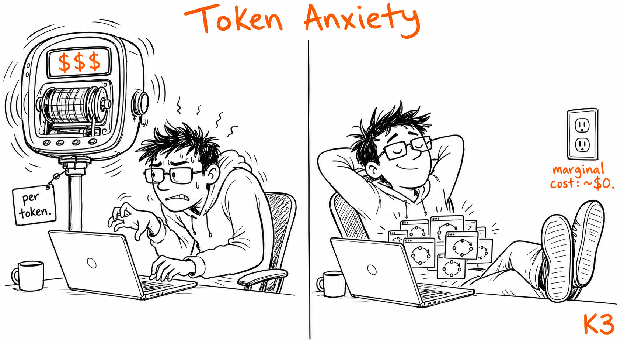
The pleasant surprise: token anxiety goes away
With hosted APIs, every retry, every long context, every agent loop maps straight to a bill. That changes how you experiment. I catch myself being more cautious with autonomous tools than I probably need to be, just because I can see the meter running.
The GX10 isn't free. Hardware, power, setup time, all of that is real cost. But the marginal cost of one more internal prompt or one more local agent loop stops feeling like it's being counted. That shift matters more than any benchmark number would.
Where this doesn't replace anything
I wouldn't position this as a replacement for Claude, GPT, or other frontier hosted models. They still win on general reasoning quality, tool reliability, and long-context behavior, and they're going to keep winning there for a while. What's changed is that local models are now good enough to be genuinely useful for a growing slice of internal work, especially anywhere privacy, low marginal cost, or repeated experimentation matters more than squeezing out the last bit of quality.
The right way to think about it isn't "this beats Claude." It's: for some of our internal workloads, we can own the inference path outright.
What's next
The 128GB of unified memory is the headline advantage for running bigger models, but memory capacity is only part of the story, bandwidth and runtime efficiency matter too. If we scale this further, it probably looks like more GX10 nodes behind the same LiteLLM gateway, an always-on efficient model on one node, something larger or more specialized on another, with cloud fallback to a frontier model when quality matters more than cost or privacy. Same gateway, same client experience, the routing just gets smarter behind it.
We didn't unbox a fast AI computer. We stood up a model provider that happens to sit on a shelf in our office, and the rest of the team can build on it without ever knowing what's behind the endpoint.
I’m excited to keep working on this. Check back for more!